Edit Like a Pro.
Create Without Limits.
Editoria Desktop Studio delivers pro-level AI captions, 80+ kinetic animations, Cloud Whisper accuracy, and zero watermarks — ₹299/- Only for Lifetime Usage on Windows PC.
Everything You Need
to Tell Your Story
Architected from the ground up for Indian content creators, viral Reels editors, podcast hosts, and video agencies. Fast, private, hardware-accelerated, and 100% watermark-free.
Neural Whisper AI & Bilingual Hub
Cloud Whisper Large-v3 delivers 99.8% precision with specialized recognition for colloquial Tamil, Tanglish, Hindi, and 90+ global languages.
Native NLE Project Pipeline
Directly export editable CapCut Draft projects (.json) and Adobe Premiere Pro .MOGRT packages with bundled media and typography.
HTML B-Roll & Motion Graphics
Turn raw HTML/CSS code blocks, live stock charts, and stat counters directly into broadcast-grade 60FPS video overlays without complex motion tools.
Cloud Whisper AI Transcription
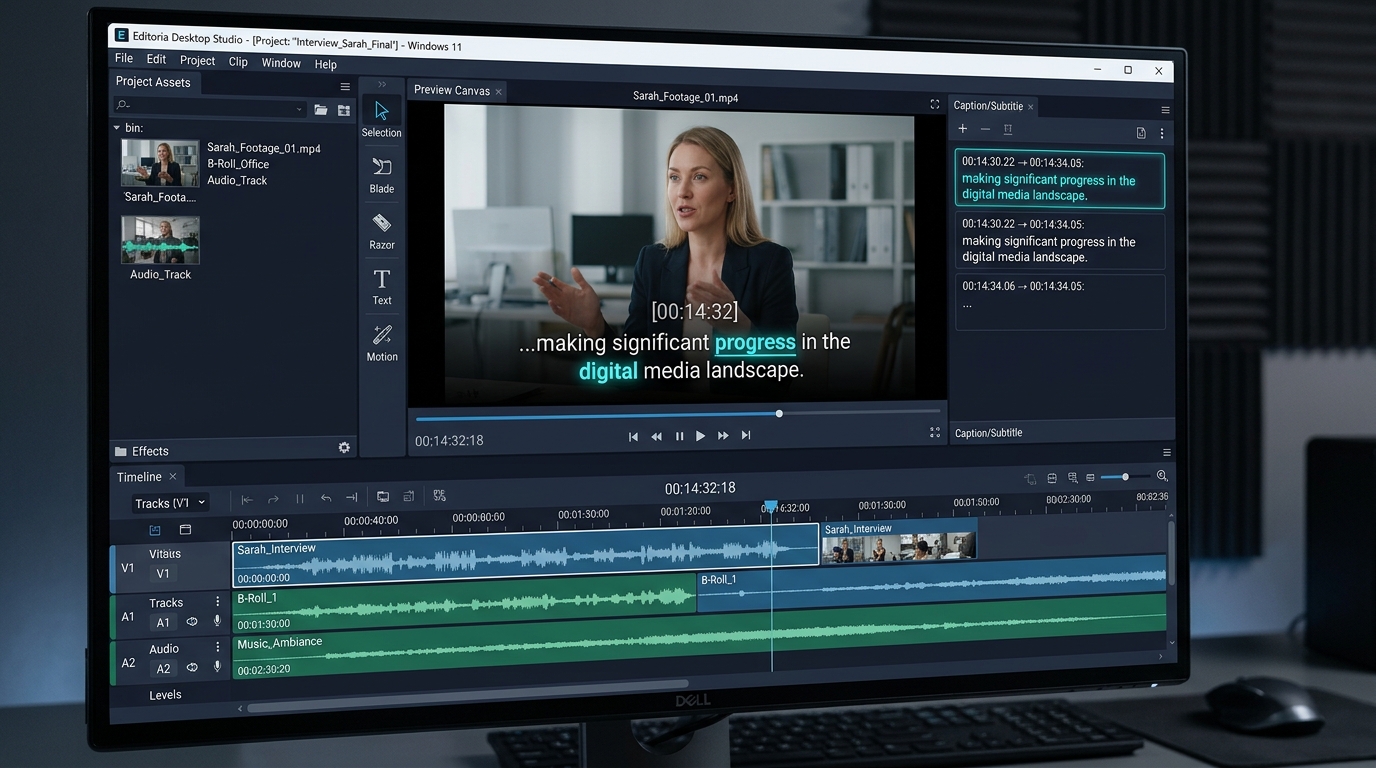
Powered by Whisper Large-v3 hosted on desktop.editoria.in. Upload audio or video and generate 99.8% accurate auto-captions with word-level millisecond sync.
Tamil & Tanglish Speech Recognition
Specialized bilingual neural model that recognizes colloquial Tamil and Tanglish speech patterns, converting them into clean, viral English and Tamil subtitles.
90+ Language Subtitle Support
Generate accurate auto-captions in over 90 languages via Cloud Whisper. Native support for Hindi, Tamil, Telugu, Malayalam, Kannada, Bengali, Punjabi, and Gujarati.
100% Offline Mode Included
The Windows installer bundles complete offline neural speech recognition models and local rendering engines. Edit, transcribe, and export with zero internet access.
80+ Kinetic Subtitle Animations
Hormozi word boxes, bouncing karaoke highlights, neon glow auras, typewriter effects, slide-in cascades, and multi-color gradient text presets.
Word-by-Word Karaoke Highlights
Each spoken word lights up individually with active color boxes, scale zoom pops, glow auras, and smooth timeline progress indicators.
Dual-Font Typography Engine
Independently control font family, weight, size, and alignment for Line 1 (primary bold hook) and Line 2 (editorial serif support) for balanced composition.
Custom Color Grading & LUTs
Fine-tune contrast, saturation, and vibrancy. Apply professional cinematic LUT presets directly on your subtitle canvas timeline with live GPU preview.
CapCut Desktop 1-Click Auto-Patcher
Stitch animated subtitle clips directly into CapCut Desktop timelines with a single click. Exports native draft_content.json with fully editable text.
CapCut Draft Project Export (.zip)
Export your subtitled clips as complete CapCut Draft projects (.zip) with word-level timecodes for seamless continuation in CapCut PC and mobile.
Adobe Premiere Pro .MOGRT Export
Export standalone Motion Graphics Templates (.mogrt) and Sequence XML files compatible with Premiere Pro CC 2018 through 2026+ with media and fonts bundled.
Transparent Alpha & Animated GIF
Export transparent background video clips and luminous glowing animated GIFs for seamless overlay across DaVinci Resolve, Final Cut Pro, or Premiere.
Multi-Track Magnetic Timeline
Layer video clips, voiceover tracks, sound effects, and kinetic subtitle animations with frame-accurate magnetic timeline scrubbing and snapping.
HTML B-Roll & Motion Graphics Engine
India's first tool to render live HTML/CSS code blocks, glassmorphic stat counters, and animated lower-thirds directly as broadcast 60FPS video clips.
Hardware NVENC 60FPS Export
GPU-accelerated export using NVIDIA NVENC, Intel QuickSync, and AMD VCE. Render crystal-clear 4K 60FPS master videos without CPU throttling.
Sound FX Auto-Triggers
Automatically trigger whooshes, typewriter clicks, bass drops, and pops perfectly synchronized to each active word highlight entry.
Zero Watermark — Lifetime License
One-time payment of ₹299/- gives you unlimited watermark-free exports on your Windows PC forever. ₹299/- Only for Lifetime Usage with zero export limits.
Offline Speech Neural Weights
Bundled with local Vosk and Whisper neural models. Process sensitive client footage locally on your device with complete privacy and zero data leakage.
Pay ₹299/- Once& Get Everything Unlimited
Unlimited Usage ( Lifetime Usage )
Zero recurring fees, no monthly bills. Single-PC machine-locked license forever.
Unlimited Transcriptions
Cloud Whisper Large-v3 + 100% offline local neural AI speech recognition.
Unlimited Subtitle Styling Posibilities
80+ kinetic typography animations, Hormozi boxes, neon glows & karaoke pops.
Unlimited Exports
Full 4K 60FPS GPU NVENC accelerated rendering with 100% zero watermarks.
Lifetime Free Updates
All future desktop updates, new kinetic presets, and dictionary patches included.
Get Started in Under 60 Seconds
Download the standalone offline installer now and activate your permanent single-PC license with ₹299/- Only for Lifetime Usage.
Start Creating with
80+ Stunning Templates
No fake mockup pictures — 100% pure coded kinetic typography. Featuring 80+ pro presets built natively into Editoria Desktop Studio with "Import Word on Big" keyword scaling, 10+ Zig Zag modes, and auto sound sync. Live-preview 4 featured templates below:
Alex Hormozi Word Box
The iconic high-retention caption style popularized by Alex Hormozi. High-contrast typography with instant yellow box word pop that holds retention in the first 3 seconds.
When transcribing speech via Whisper AI, keywords like "MILLIONS" automatically enlarge with high-contrast color boxes and sound FX triggers for maximum audience hook retention.
Pre-installed in Editoria Desktop Studio with kinetic word-level keyframes & customizable fonts.
Explore all 80+ kinetic typography presets, 10+ Zig Zag modes, and bilingual captions natively in the Windows Desktop App.
Native CapCut & Adobe Premiere Pro Project Template Export
Never settle for burnt-in flat MP4 captions. Editoria Desktop Studio packages every template as fully editable vector tracks, keyframes, and motion curves directly compatible with CapCut Desktop and Adobe Premiere Pro 2026/2025/2024.
Exports full draft_content.json with exact word-level timecodes. Double-click to open right into CapCut with 100% editable text.
Exports motion graphics templates and sequence marker XML files. GPU NVENC accelerated rendering preserves full vector crispness.
Generate unlimited project template files completely offline on your Windows PC. No render queues, zero recurring subscriptions.
Latest from the Blog
Guides, updates, and creator strategies from the Editoria team.
September 2026 Major Update: Vosk Offline AI, 80+ Animations & Native Apps Roadmap
Our biggest release yet: Vosk 100% offline neural speech-to-text, 80+ cinema-grade subtitle animations, and our official native Windows app roadmap.
How to Create Alex Hormozi-Style Word Box Captions That 10x Viewer Retention
Learn the exact typography, timing, and color techniques behind the viral yellow word box caption style that dominates YouTube Shorts and TikTok.
Tamil Creators' Complete Guide to Auto-Subtitles with Editoria Desktop
How Tamil and Tanglish creators in India are using Editoria's bilingual Whisper AI to auto-generate English subtitles from their Tamil speech videos.
Trusted by creators worldwide
Hear from creators who use Editoria Desktop every day.
“The CapCut auto-patcher saved our agency 4 hours per day. Subtitles stitch right into the timeline perfectly.”
“Cloud Whisper on desktop.editoria.in is incredibly fast and accurate. Even my Tanglish audio was transcribed perfectly.”
“Paying Rs.299 once instead of $30/month for cloud apps is a no-brainer. NVENC 60FPS exports are blazing fast.”
“HTML B-Roll code mockups look broadcast quality. You cannot find this feature in any other editor on Windows.”
“The Hormozi-style captions boosted my Reels retention from 40% to 78% in just two weeks. Game-changer.”
“Tamil bilingual auto-captions work better than any tool I have tried. Perfect for my Tamil podcast.”
“The offline mode is a lifesaver when I am traveling. No internet needed — full AI and render quality preserved.”
“Premiere Pro MOGRT export is clean. I can take Editoria-generated captions directly into Premiere Pro without any re-work.”
System Requirements for Windows PC
Lightweight standalone installer engineered for Windows 10 and 11.
Frequently Asked Questions
Start Creating for Free Today
Download Editoria Desktop and join 50,000+ creators around the world.
₹299/- Only for Lifetime Usage — Zero recurring fees, unlimited watermark-free exports forever.